[2022 - 2024]
Building Re-engagement and Retention Beyond the Broadcast Window
Turning ephemeral live broadcasts into replayable and shareable assets through archive and short-clip workflows.
I built the workflows that enabled streamers and viewers to replay, clip, and redistribute live moments beyond the original broadcast window.
ROLE
Product Designer
SCOPE
Archive, 90-second clip workflow, reusable video player
KEY IMPACT
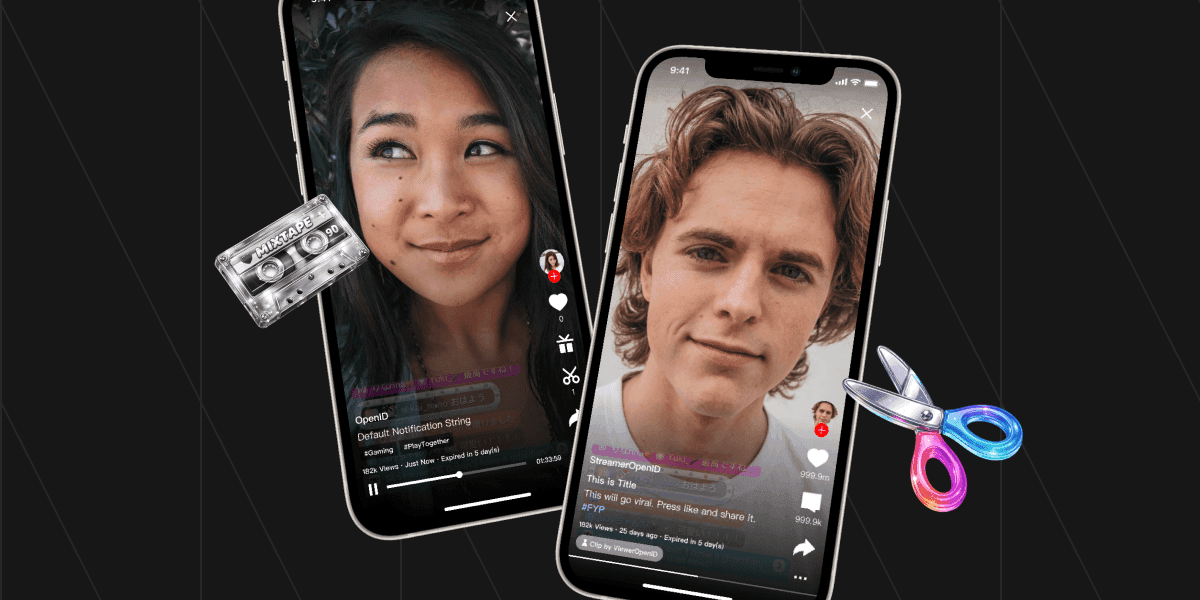
retention lift reached +4.1pp, and streamer entry CTR improved from 0.6% to 9.9% after clip UI optimization.
01
Overview
Offline Content as a Re-engagement and Retention Loop
This case study covers how live content was expanded from real-time-only consumption into a reusable content system across replay and short-form surfaces.
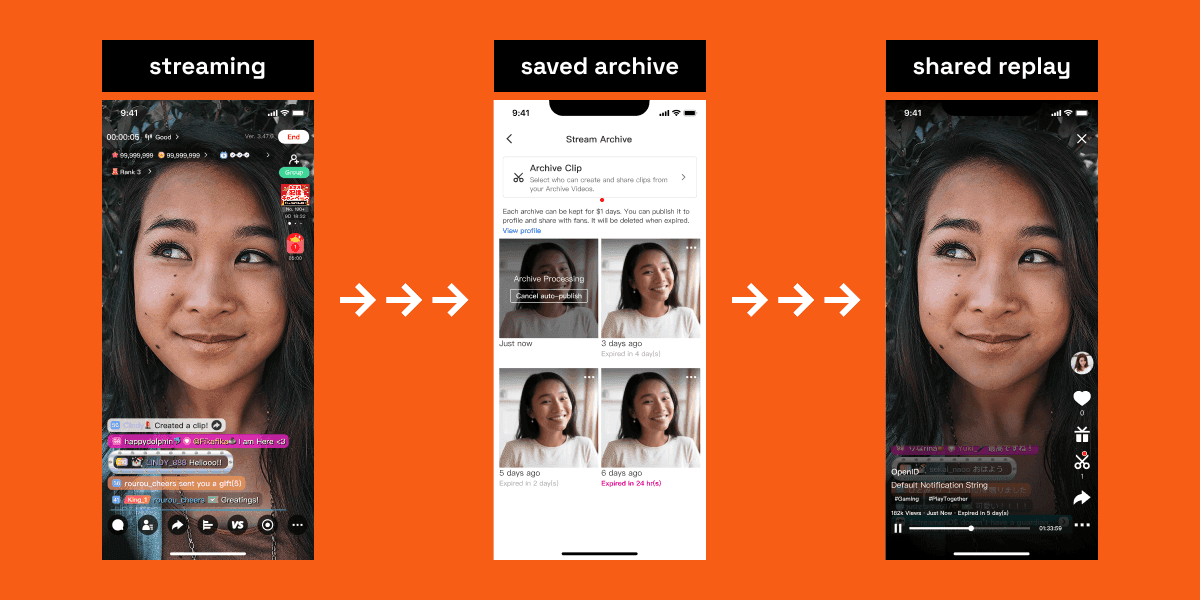
The work combined two connected capabilities: archive for persistent playback, and 90-second clipping for lightweight sharing and redistribution.
Together, these capabilities shifted live content from one-time sessions to an extendable lifecycle that can support discovery, re-engagement, and streamer growth.
02
Product Context
Why Live Content Needed to Survive Beyond the Broadcast Window
The platform is a livestream ecosystem where content value is traditionally concentrated in a narrow live window.
Core constraints in this context:
Live content is naturally real-time and ephemeral.
Discovery after livestream ends is limited without replay surfaces.
Users who want highlights often prefer shorter, shareable formats.
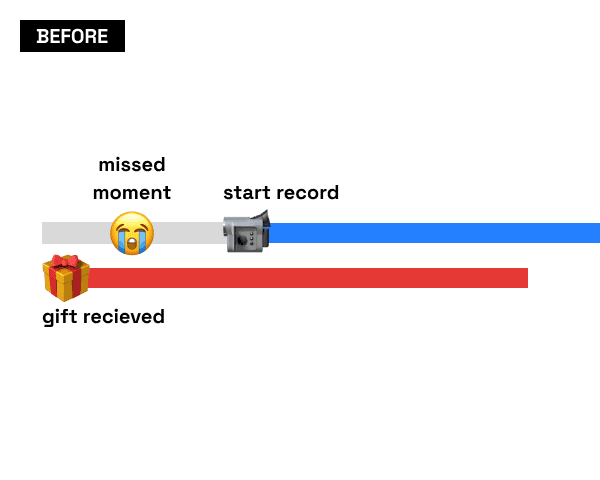
The previous highlight workflow only started recording after the streamer manually tapped a button during the live, which made spontaneous moments easy to miss.
Strategically, the problem mattered because lifecycle extension affects not only content supply, but also post-live traffic quality, streamer visibility, and downstream engagement.
Research across Japan and Taiwan made the gap clear: archive worked as catch-up and moment preservation, but not as a strong discovery format. Full-length replay was too long and too hard to browse when users only wanted the highlights. That made archive a useful foundation, but not the full solution.
03
Problem
04
Outcome
Delivered replayable live streams through archive.
Delivered short-form highlight creation through 90-second clips.
Delivered a reusable video player that supports different content lengths and content types.
Landed the first in-product video trimmer to make clipping operationally usable.
Established a live -> replay -> short-form lifecycle model.
05
Role & Scope
I led the system design direction for the archive and clip lifecycle in partnership with another designer under a UI/UX split model.
OWNERSHIP
Cross-surface experience architecture for replay, clipping, sharing, and the reusable player/trimmer foundation.
WORKING WITH
Product, data, and operations — prioritizing behavior-signal-driven iterations.
06
Key Decisions
1
Archive as the Foundation Layer
2
Backward-Looking 90-Second Capture
3
One Player Architecture for All Content Types
4
Streamer Entry as a Conversion Lever
07
Design Execution
Reusable Video Player
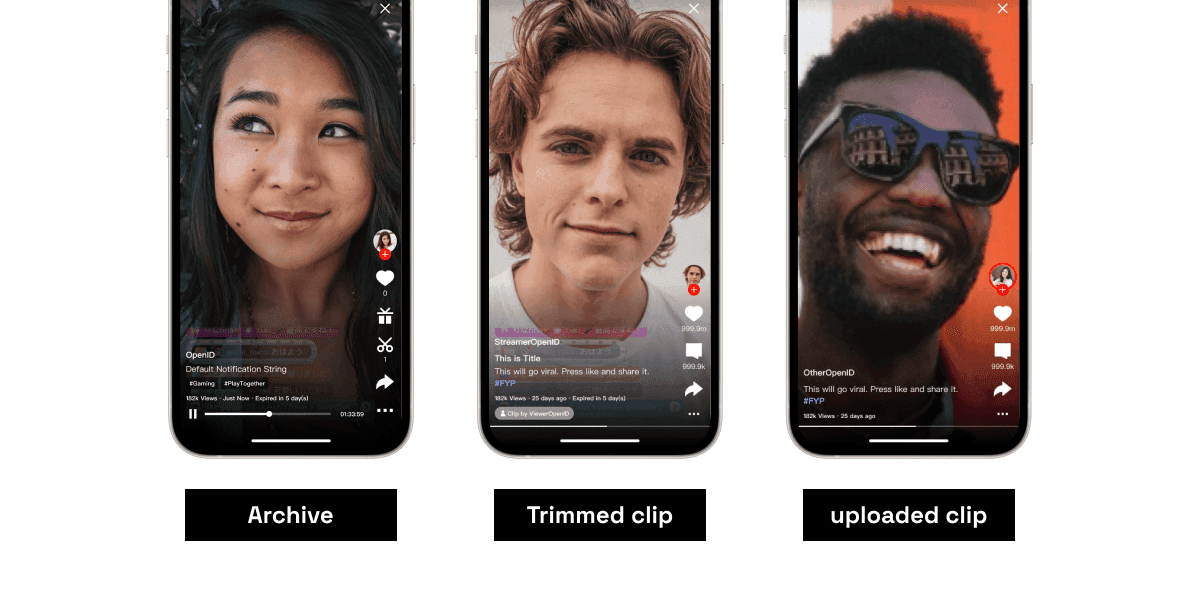
I started from the player layer, because archive and clip would fall apart quickly if playback behavior changed from one surface to another. So I pushed for one player architecture that could handle both archive and short-form playback across different durations and content types. The easier path would have been separate solutions for separate surfaces, but that would have forced users to relearn controls depending on what they were watching and doubled the maintenance burden later. I also aligned the UX output from multiple designers into one interaction framework so the player behaved like one system instead of a pile of related screens.
Clip Creation and Trimming
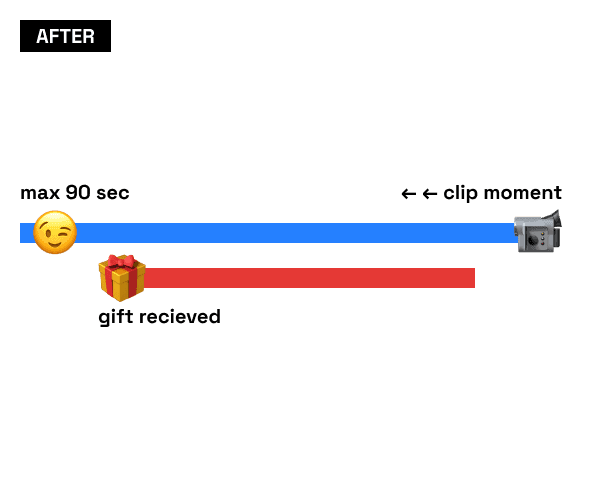
From there, I designed the clip flow around one specific behavior: people recognize a moment after it happens, not before. That is why I used a 90-second backward-looking capture flow. Tapping clip retrieves the prior 90 seconds instead of asking people to predict the moment in advance. Once I made that decision, the UX problem changed. I no longer needed to help users record at the right time. I needed to surface the clip action at the right moment during replay.
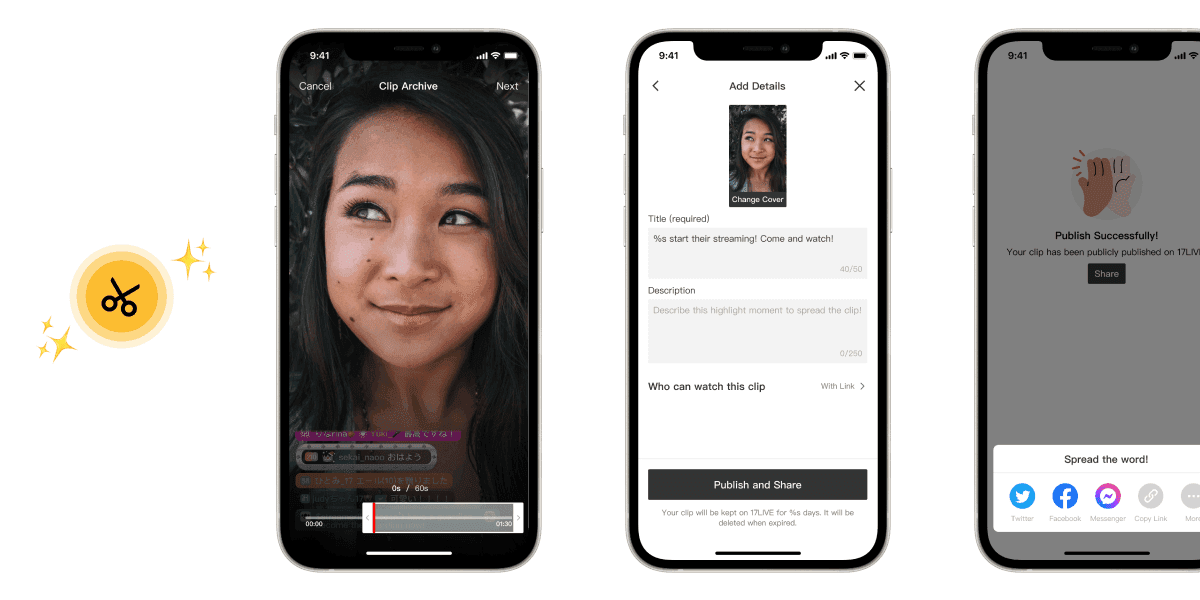
That decision only worked if the flow stayed operationally usable. So I also designed the first in-product video trimmer and opened clip creation to permissioned viewers as well as streamers, from both live sessions and archive playback. The goal was to turn recognition into action with as little extra work as possible.
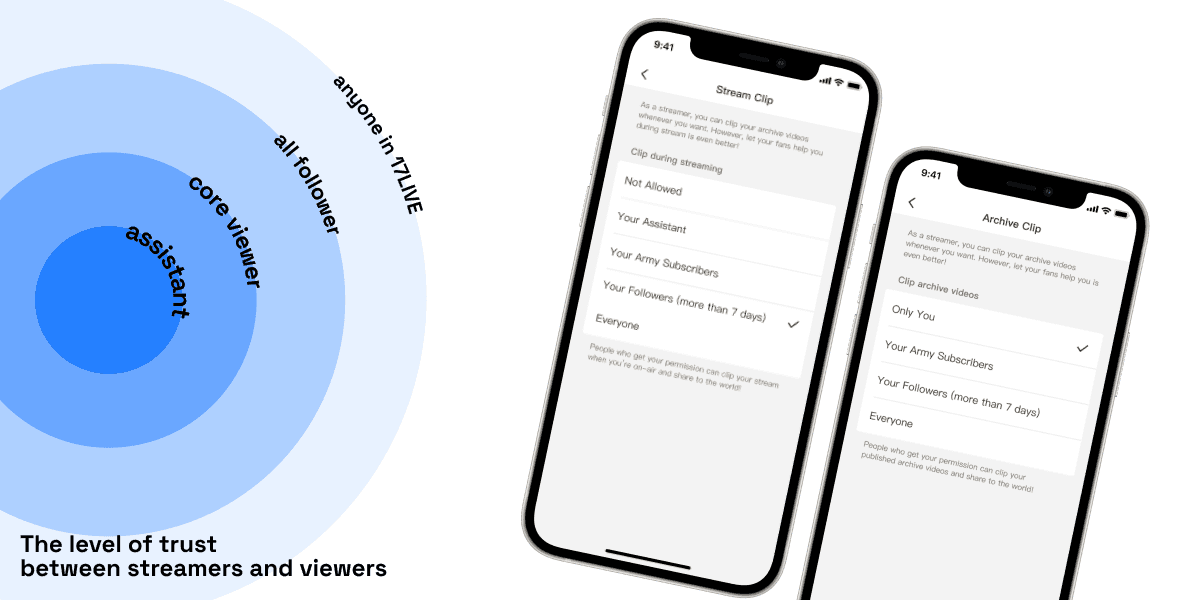
Sharing and Entry Flow
The last part was making sure clip consumption could lead somewhere. I designed the sharing flow for both external and in-app destinations, but the bigger issue was conversion. High clip consumption without visible streamer presence is just traffic that does not go anywhere. So I changed clip playback so the streamer was visible by default and the path back to their profile or live room was direct rather than buried below the video.
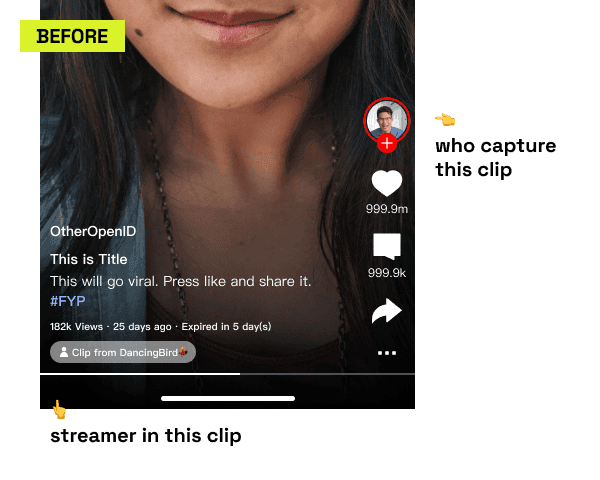
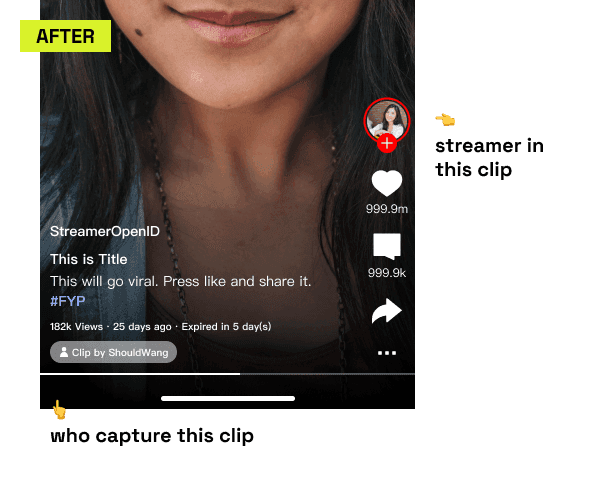
That later proved to be the right lever when CTR moved from 0.6% to 9.9%. After that, I kept iterating from entry source, click-through, and conversion signals instead of assuming the first layout had already solved the problem.
08
Impact
Clip Engagement Rate
16.7%
90s clip section — clear pull for bite-sized post-live content
Streamer Profile CTR
+9.3pp
0.6% → 9.9% after clip UI placement optimization
Archive Viewer Retention
+4.1pp
85.9% vs 81.8% for non-archive users
Share-Link Conversion
5.2%
Follow rate · 3.0% watch-live conversion from shared clips
Offline Streamer Activation
+3.0%
Overall activation · +10.1% among first-time offline content creators
What This Indicates
Archive and clip extended content value beyond the original live window, with measurable gains in both re-engagement and retention.
The clearest leverage came from the discovery → re-engagement path, where distribution, playback, and streamer entry design worked together as one lifecycle system — not as independent features.
09
Reflection
What worked well
Making archive the foundation first, then pushing clip as the next layer, turned out to be the right sequencing. Archive made post-live playback possible, but clip was the step that made redistribution and re-engagement materially stronger, and pushing for that shift early helped the lifecycle expand beyond replay alone.
What was challenging
The hardest trade-off was that broader clip adoption depended on broader archive adoption, but streamer control and platform distribution incentives did not always align. Some streamers wanted the value of clip creation without enabling archive or without opening clipping access more widely, which meant the old highlight-recording flow could not be fully sunset even though the new clip model was structurally stronger.
What to improve next
If I did this again, I would define clip entry and placement earlier from the user goal and intended flow, rather than spending too long aligning to existing architecture first. The strongest later signal came from purpose-driven placement, so that hypothesis should have been tested sooner.
10
Other Projects
✨
✨
Made with love, Framer, and Claude Code